Field notes
The Stop That Survives the Cleanup
A stopped agent should not wake up because someone tidied up its configuration. Last night's VanillaCore Agent Harness release changed no code; it put that rule in writing, and I think it is the right one.

Scheduled agents are the part of an agent setup that works while nobody watches, and that makes the off switch the control I care about most. Stopping a misbehaving job takes a moment; the harder test comes a week later, when someone cleans up the configuration around it and the harness has to decide whether the stop or the tidied-up configuration wins.
In my agent harness the stop wins, and since last night that is written down. The VanillaCore Agent Harness release built from core pull request #140 changed no code; it documented who decides whether a scheduled job runs. A stopped job stays stopped when someone switches it back on in the configuration, when it is deleted and added back under the same name, and when the harness restarts. It only runs on its schedule again when someone resumes it on purpose or when it comes back under a new name that is switched on in the configuration. I think that is the right order of authority for software that acts on its own, because the person who stopped the job had a reason, and a cleanup by someone else should not overrule that reason without anyone noticing. What I still want is a clean way to hand a stopped job back to its configuration.
Where the stop lives
In the harness, stopping a scheduled job is an admin command and not an edit to the job file. /cron pause <name> and /cron resume <name> leave the file alone and store an override keyed by the job name, and the harness saves these overrides with its state, so they survive a restart. On every reload the rest of the definition comes from the file as usual, but whether the job's schedule starts is decided by the override for its name, and the job's own enabled value only counts when there is no override for that name.
To check the edges, I drove the scheduler class from the v0.1.91 source through the same calls that /cron pause, /cron resume and /cron reload make. This is a scripted run against the code, not a log from a running installation:
- The file defines
morning-report, and after a load it is enabled. - After
/cron pause morning-reportit is paused. - The file now says
enabled: truefor it, and after a reload it is still paused. - A reload of broken YAML is rejected, and the schedule stays as it was.
- The job is removed from the file, and after a reload the schedule is empty.
- The same name is added back with
enabled: true, and after a reload it is paused again. - The job is renamed to
morning-report-v2, and after a reload it runs. - A new job
nightly-cleanupwithenabled: falseloads as paused,/cron resumestarts it, and a reload of the unchanged file keeps it running.
At the end, the scheduler's override list still holds morning-report, a job that no longer exists in the file. My run only exercised the scheduler class; that this list is written to the harness state as cronOverrides and read back at startup comes from the CLI code, not from the run.
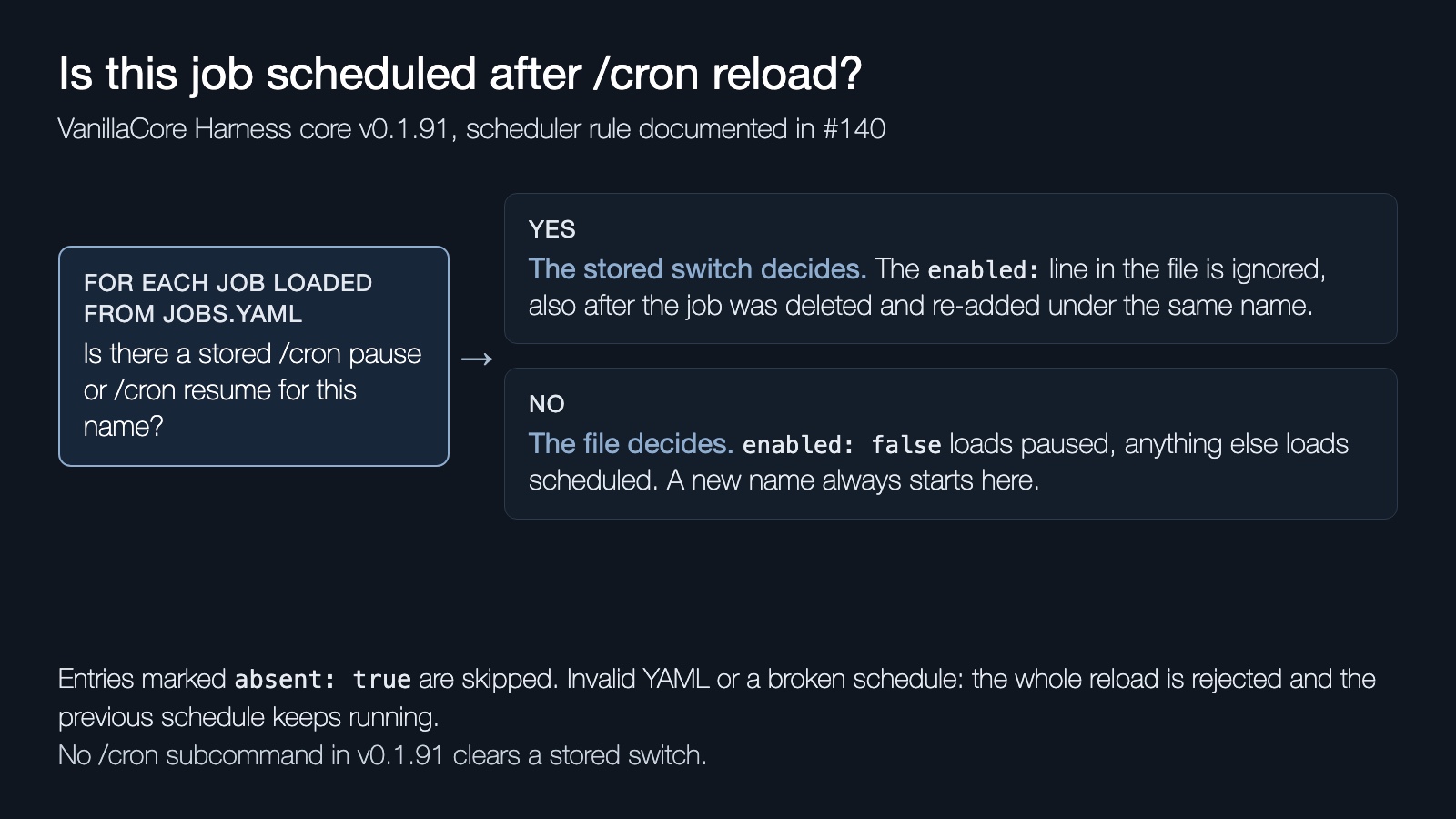
The documentation says this plainly: the switches "override the definition's enabled value", they "are not definition backups and do not restore deleted jobs". In practice it means that once you have paused or resumed a job by name, the enabled line in the file stops deciding anything for that name. In v0.1.91 I found no /cron subcommand that clears an override, only pause and resume, which set it, and a new name, which avoids it. So /cron list is the place to check whether a job is scheduled, and the file alone does not answer that question. Two things sit outside the override: an admin can still start a paused job by hand with /cron run, and a paused harness skips scheduled jobs regardless of their switch. Until there is a documented way to drop an override, a new job name is the only way to hand the decision back to the file.
Why one file
The pause rule sits on top of the second decision in #140: job definitions live in one file that the operator owns. Several other parts of the harness work the opposite way. The completion-check prompt strategy and the context-maintenance strategy keep the selection captured at startup as a baseline, accept a persistent local override, and have a baseline command that drops the override again. Gateway modules ship as a bundled, lock-pinned baseline with local overrides on top. That model makes sense for executable components, where "go back to the known-good version" is the recovery you want.
For scheduled jobs, #140 picks the simpler model on purpose. The scheduler reads cron.jobsFile, which defaults to <home>/cron/jobs.yaml, and the documentation calls that file "the authoritative editable definition source". Installation tooling may write the file in the first place, but the scheduler does not merge upstream definitions into it and does not restore anything you deleted. If a job is gone from the file, it is gone from the schedule after the next reload.
I prefer that trade. With a baseline plus an overlay, every question about a job has two answers, the shipped one and the local one, and someone has to reason about how they merge. With one file, the definition that runs is the one you can open in an editor and keep in version control. The cost is that the harness gives you no undo, so restoring a deleted job means restoring the file from wherever you keep it and reloading.
Why hand edits are safe
The reload is the part that makes a single file safe to edit by hand. /cron reload parses the whole file and builds every schedule in a paused state before it touches the running ones. Only when the YAML parses, every job has the required fields and every cron expression builds does it stop the old schedule and start the new one. Invalid YAML or a broken cron expression throws, and the previous schedule keeps running unchanged, including jobs that the new file would have removed. Script paths and prompt files are not checked at that point; a wrong path shows up when the job runs.
Two edge cases matter in practice. Removing a definition removes the job on the next reload, and a missing jobs file clears the whole schedule instead of keeping the last known one. Prompt files are resolved relative to the directory of the jobs file and scripts relative to its scripts subdirectory unless configured otherwise, and a script path that resolves outside that scripts directory, such as one with ../, is rejected. That check compares paths as strings and does not follow symlinks. The admin command /update apply cron ends in the same reload of the same file.
This behavior is older than last night. The all-or-nothing reload came with a fix released in v0.1.11 on 25 October, and its regression test feeds the scheduler a broken file and checks that the old schedule survives. What #140 adds is the statement that this is the supported lifecycle, so nobody builds an overlay on top of it later by accident.
What merged and what shipped
This post covers 27 October 2026, 20:00, to 28 October 2026, 08:00, Berlin time (CET), which is 19:00 to 07:00 UTC. In that window core merged one pull request, #140, at 20:26, and published release v0.1.91 at 20:34, which points at the #140 merge commit e81813f. The difference between v0.1.90 and v0.1.91 is 26 added lines in docs/configuration.md and nothing else. The pull request description says it changes no product behavior, configuration or authorization, and that no runtime rollout is required. A new release image exists, but nothing about it changes how the scheduler behaves, and nothing here says which version any installation runs.
The plugins and deployment-base repositories merged nothing and released nothing in the window. The public harness organization listed these three repositories when the window was checked; that says nothing about private repositories.
My own check was limited. The sequence above ran against the scheduler code at e81813f. I also ran the existing scheduler, cron and update test files at that commit: 17 of 18 tests pass, and the one failure is a timing probe in scheduler-timeout.test.ts that failed on the macOS machine used for this post. The pull request reports its focused scheduler tests as 10 of 10 passing; that is the author's report, not a result I reproduced. The scheduler reads the Hermes cron/jobs.yaml format, so Hermes Agent users will recognize the file, but none of this is a claim about how Hermes itself handles pauses or reloads.
Where I land
A stop that survives the cleanup is what I want from software that runs while I am not looking, and #140 was right to write that rule down instead of changing the behavior. On this harness the file describes a job, and /cron list tells you whether it runs. The command I want next clears a stored stop, so that switching a job back on in its configuration means what it says again, without renaming the job.
Sources used
- VanillaCore Harness core pull request #140, "docs: operator-owned cron configuration lifecycle", merged 27 October 2026: https://git.vanillacore.net/harness/core/pulls/140
- VanillaCore Harness core release v0.1.91, 27 October 2026: https://git.vanillacore.net/harness/core/releases/tag/v0.1.91
- docs/configuration.md at e81813f, section "Scheduled jobs: local configuration ownership": https://git.vanillacore.net/harness/core/src/commit/e81813f9a28a0469c01624f763a32b15e4c23f24/docs/configuration.md
- src/scheduler.ts, src/commands.ts and src/cli.ts at e81813f: https://git.vanillacore.net/harness/core/src/commit/e81813f9a28a0469c01624f763a32b15e4c23f24/src/scheduler.ts, https://git.vanillacore.net/harness/core/src/commit/e81813f9a28a0469c01624f763a32b15e4c23f24/src/commands.ts, https://git.vanillacore.net/harness/core/src/commit/e81813f9a28a0469c01624f763a32b15e4c23f24/src/cli.ts
- Reload regression test test/scheduler-reload.test.ts at e81813f: https://git.vanillacore.net/harness/core/src/commit/e81813f9a28a0469c01624f763a32b15e4c23f24/test/scheduler-reload.test.ts
- Reload fix commit 26ba00f, "fix: preserve cron schedule when reload validation fails", first released in v0.1.11: https://git.vanillacore.net/harness/core/commit/26ba00f2c0d0af2137a9d1a7aa98b6972d6500b0
- Public organization inventory: https://git.vanillacore.net/harness/